Personal life
Groceries, birthdays, school forms, packing a trip, a move — anything that lives in group chats or brain-dump notes turns into one clear list.
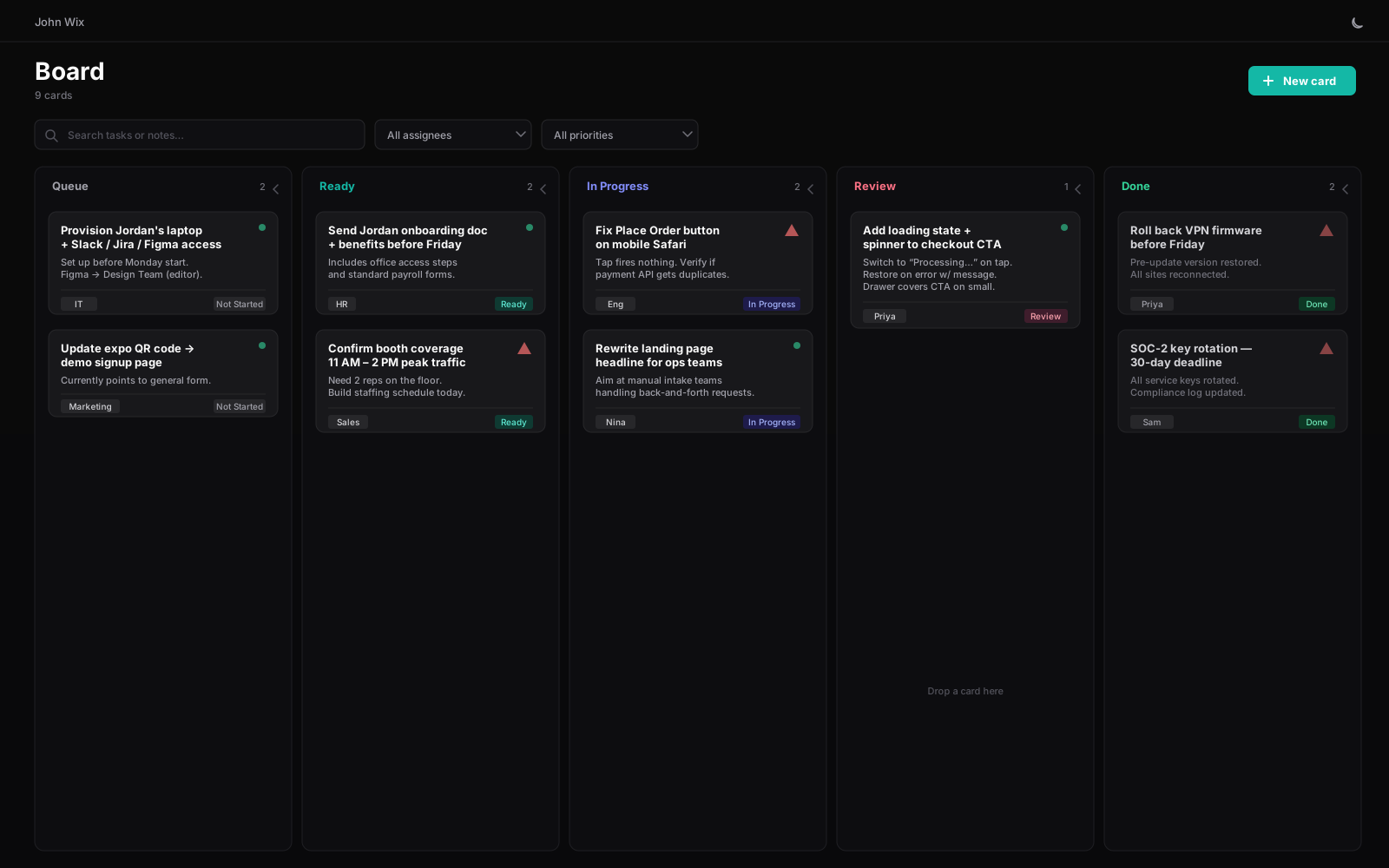
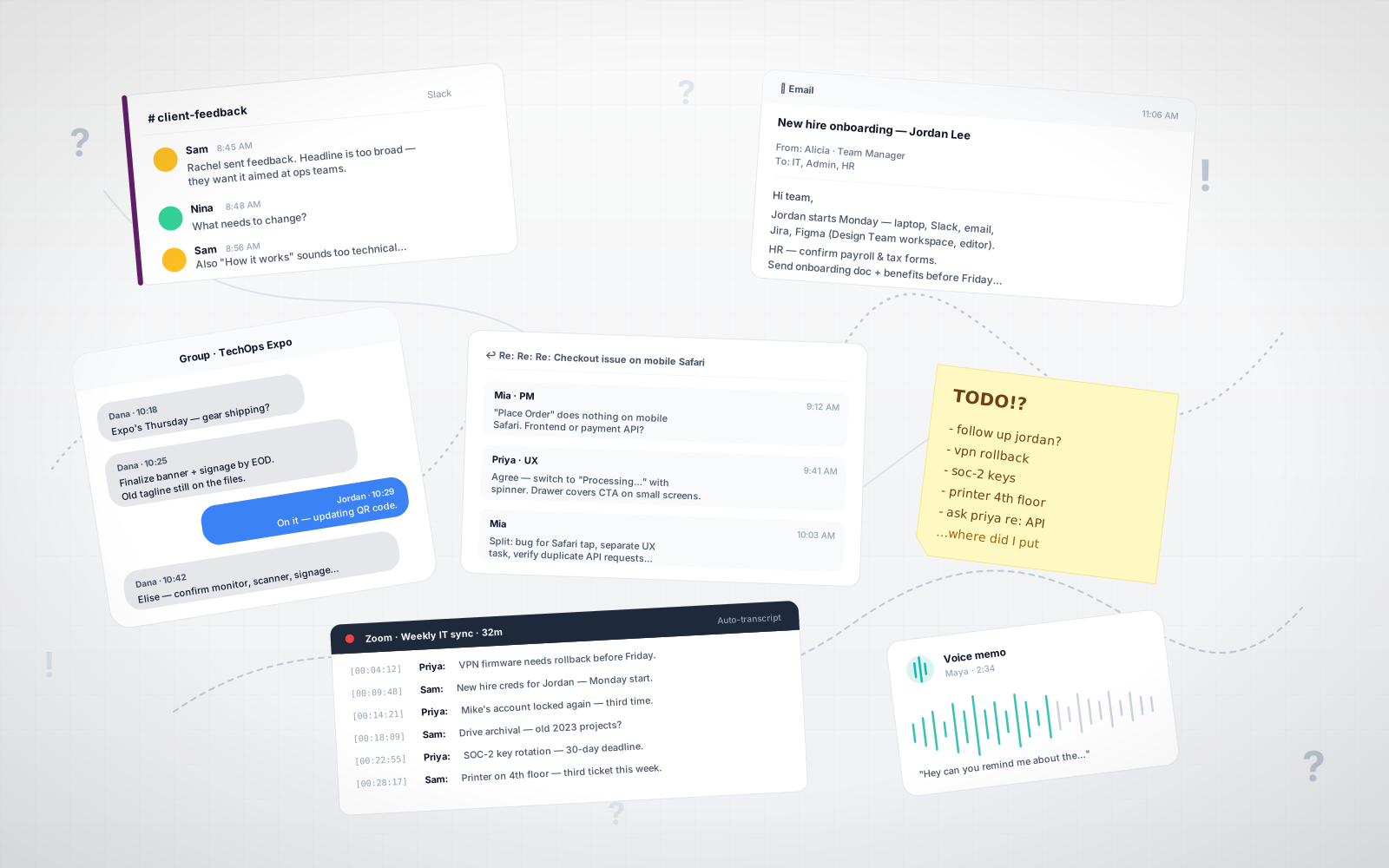
kamotion turns Slack threads, email chains, Zoom transcripts, and meeting notes into structured kanban cards. Paste the noise. AI does the parsing. You do the work.
Customer reports the Place Order button does nothing on mobile Safari.
Agree on loading state — switch to “Processing…” + spinner on tap.
Let’s split: bug for Safari tap, UX task for loading state, and verify the API for duplicate requests.
Fix Place Order tap on mobile Safari
High · Bug
Add loading state + spinner to checkout CTA
Normal · UX
Verify payment API for duplicate requests
Normal · Eng
Fix Place Order tap on Safari
Add loading state to checkout
Verify duplicate API requests
Reply to Acme contract thread
Your work shows up everywhere. kamotion reads it all.
No new process to learn. Just take whatever form the work showed up in and drop it in.
A Zoom transcript. A 40-reply email chain. A Slack thread. Meeting notes. Whatever form the work showed up in — paste it.
kamotion pulls out what's actionable, who owns it, who asked, and when it's due. You get a preview to edit before anything saves.
Cards land in your Queue. Drag across Ready → In Progress → Review → Done. Switch to Gantt when you need a timeline.
Convert long emails, Slack threads, texts, and support conversations into clear Kanban cards with issue summaries and suggested fixes.
Hi team,
Jordan Lee starts next Monday as our new Product Designer. Can we make sure everything is ready before their first day?
They’ll need a laptop with standard permissions, plus access to Slack, email, Jira, and Figma (Design Team workspace, editor).
Please add Jordan to the Product Standup, Design Review, and Monday onboarding invites. HR — confirm payroll and tax forms before Friday…
Need to track your hours? Work already lives in your cards — now time tracking does too. Start timers directly from each row, manually log missed hours, and drag cards between stages while kanban, gantt, and timesheets stay synced automatically.
Mon May 4 → Sun May 10 · 13h logged
| Last logged | Card | Status | Category | Timer | Total | |
|---|---|---|---|---|---|---|
| 2026-05-08 | Refresh quarterly partner deck | In Progress | Design | 27:01 | 3h 30m | |
| 2026-05-07 | Migrate analytics from UA to GA4 | In Progress | Code | 4h 45m | ||
| 2026-05-05 | Fix mobile checkout double-tap bug | Blocked | Code | 45m |
| Last logged | Card | Status | Category | Timer | Total | |
|---|---|---|---|---|---|---|
| 2026-05-06 | Onboarding flow copy review | Review | Revision | 1h | ||
| 2026-05-07 | Q3 OKR review prep | Review | Meeting | 2h |
| Last logged | Card | Status | Category | Timer | Total | |
|---|---|---|---|---|---|---|
| 2026-05-04 | Wire Stripe webhook for invoice paid | Done | Code | 1h |
All time logged on this card. Edit a row to fix duration, date, category, or notes.
| Date | Category | Duration | Notes |
|---|---|---|---|
| 2026-05-08 | Design | 1h 30m | Hero slide rework |
| 2026-05-07 | Design | 2h | — |
| 2026-05-05 | R&D | 45m | Pull customer-logo refs |
| 2026-05-04 | Design | 30m | Cover slide pass 1 |
Per-card timer
One tap on the row starts billable time. The play turns into a live mm:ss readout you can stop without leaving the page.
Drag = kanban move
Drop a card from In Progress into Review and the kanban reflects it on next visit. No parallel state, no double bookkeeping.
CSV with full session fidelity
Period filter, card filter, category filter — then export. One row per session, with notes intact. Drop straight into your invoicing tool.
Groceries, birthdays, school forms, packing a trip, a move — anything that lives in group chats or brain-dump notes turns into one clear list.
Juggling three clients across four tools. One board. One source of truth. No more missed follow-ups.
Where half the tasks live in someone's DMs. Now they live where everyone can see them.
Self-host the platform, inspect the code, and extend it without limits. From custom workflows to entirely new features, developers can branch the project and build it around the way their team works.
Run it on your own infrastructure so sensitive conversations, tasks, and workflows stay where you want them.
Review the code, understand how it works, and contribute improvements instead of relying on a closed system.
Developers can fork the project, create custom features, and adapt the product far beyond the default experience.
Adapt parsing rules, task categories, Kanban stages, and resolution suggestions to match your team’s process.
Keep your conversations, cards, and workflow data portable, transparent, and under your control.
Build alongside other developers and teams turning messy conversations into organized, trackable work.
You don’t need to install anything, manage servers, or understand open source tools. If you want the benefits without the technical setup, reach out and I can help host it for you.
This is only the beginning. New features, integrations, and workflow improvements will continue to be added as the project grows, making it easier to turn messy conversations into organized, actionable work.
Take it for a spin — the demo is the real app, seeded with sample data. Nothing to install, nothing to sign up for.