Documentation
Everything you need to run kamotion
Paste the noise. Get the work. This guide covers the product, the self-hosting paths (including a $0 setup), and how to make it your own.
01
Introduction
kamotionis a personal kanban-style project manager that turns unstructured input — Slack threads, email chains, Zoom transcripts, meeting notes — into structured cards on a board. It’s built for people drowning in channels who need one place for the work to live.
The app is open source and designed to be self-hosted. You bring your own AI key (OpenRouter, OpenAI, Anthropic, Google, or a local model via Ollama), wire up a Supabase project for data + auth, and it runs anywhere Node.js runs.
Who it’s for
- Personal life — groceries, birthdays, school forms, trip packing, a move. Anything that lives in a group chat or a brain-dump note becomes one clear list.
- Solo operators — freelancers, founders, and makers who need a single pane for a noisy inbox.
- Small teams — up to a handful of members with admin/editor/viewer roles.
- Developers — anyone who wants a hackable PM tool they control end-to-end.
02
Core concepts
Six primitives make up the whole app. Learn these and the rest is configuration.
| Concept | What it is |
|---|---|
| Card | A single unit of work. Has title, description, status, priority, estimated duration, due date, assignee, and requester. |
| Column / status | Five statuses: Ready, In Progress, Review, Done, Blocked. Blocked is hidden from the main board and surfaced via the filter. |
| Priority | High (red triangle), Normal (green circle), Low (yellow inverted triangle). A card can also carry a blocked flag independent of its column. |
| Duration | Estimated time-to-complete. Slider goes from 30m → 72h → 14d. Used by Gantt to size bars. |
| Domain | Coarse classification of the work — Engineering, Design, UX, Content, Marketing, Client, Admin, or Other. Set by the AI parser; editable on the card. Nullable — older cards may not have one. |
| Team member vs user | Separate concepts. team_members are people you assign work to (can be anyone). users are people who can log in. Admin can create a user and kamotion auto-links the matching team member. |
| Archive | Soft delete. Archived cards land in /app/archive and are auto-purged by a daily pg_cron job after a configurable retention window (90 days by default; set it in Settings, or choose Keep forever to disable the purge). |
Roles
- admin — everything, including user and team management, AI settings, time-log categories, and archive admin.
- editor — read/write cards, drive the board and Gantt, log time on cards.
- viewer — read-only. Useful for stakeholders.
03
Getting started
You’ll have a working local instance in about 10 minutes. The only external dependency is a free Supabase project.
Prerequisites
- Node.js 22 (active LTS). Use
nvm use 22if you have nvm. - npm (ships with Node).
- A Supabase account — free tier works. Sign up here.
- An AI key — OpenRouter is the default and gives you access to dozens of models with one key. See AI configuration.
1. Clone and install
bashgit clone <kamotion-repo-url>
cd kamotion.io
npm install
2. Create a Supabase project
- Go to supabase.com/dashboard and create a new project. Pick a region close to you.
- In
Project Settings → API, copy yourURL,anon / public key, andservice_role secret. - In
SQL Editor, run every file insupabase/migrations/in numeric order. The set ships the schema for cards, team, users, archive, and the Time Log (categories + entries).
3. Configure environment variables
Create .env.local in the repo root:
.env.localNEXT_PUBLIC_SUPABASE_URL=https://<your-project>.supabase.co
NEXT_PUBLIC_SUPABASE_ANON_KEY=<anon-key>
SUPABASE_SERVICE_ROLE_KEY=<service-role-key>  # optional

NEXT_PUBLIC_APP_URL=http://localhost:3000
LOG_LEVEL=debug

AI_API_KEY_OPENROUTER=sk-or-v1-...
# Or any of:
# AI_API_KEY_OPENAI=sk-...
# AI_API_KEY_ANTHROPIC=sk-ant-...
# AI_API_KEY_GOOGLE=...

# Optional — only needed if you use the n8n processing path
N8N_WEBHOOK_AUTH_USER=
N8N_WEBHOOK_AUTH_PASSWORD=4. Seed your admin user
- In Supabase
Authentication → Users → Add user, create a user with your email + password. Check auto-confirm user. - In
SQL Editor, insert a profile row withrole='admin'for that user:
sqlinsert into public.profiles (id, email, full_name, role, status)
values (
  '<auth-user-id>',
  'you@example.com',
  'Your Name',
  'admin',
  'active'
);
5. Run it
bashnpm run devOpen http://localhost:3000, click Log in, use the credentials from step 4. You land on /app with a kanban board and a few seeded demo cards.
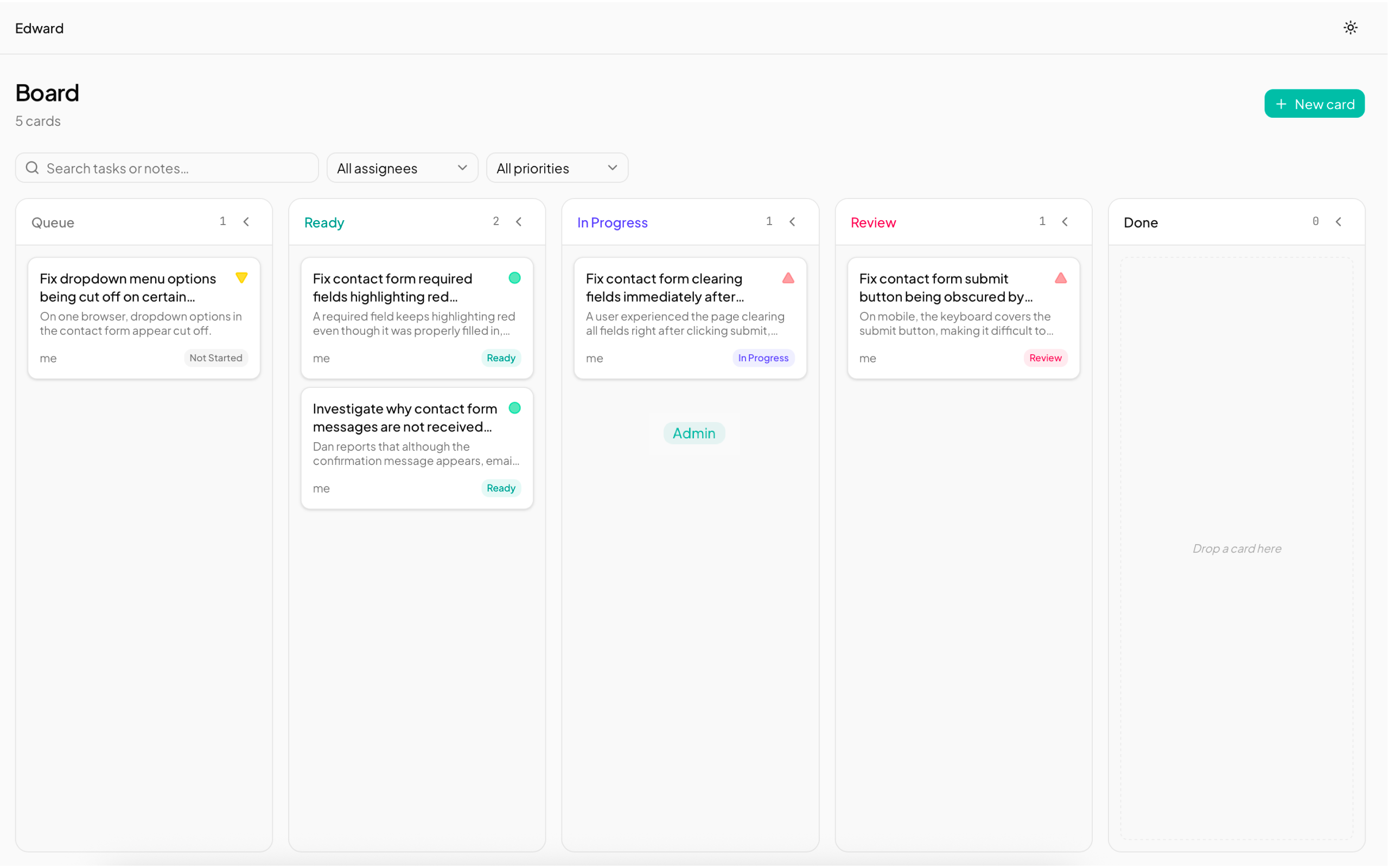
Freshly seeded board after first login — four demo cards across Ready, In Progress, Review, and Done. The admin sidebar sits on the left.
04
Generate tasks from text
The feature that gives kamotion its name. Paste any text — a Slack thread, an email, a meeting transcript — and the AI extracts cards.
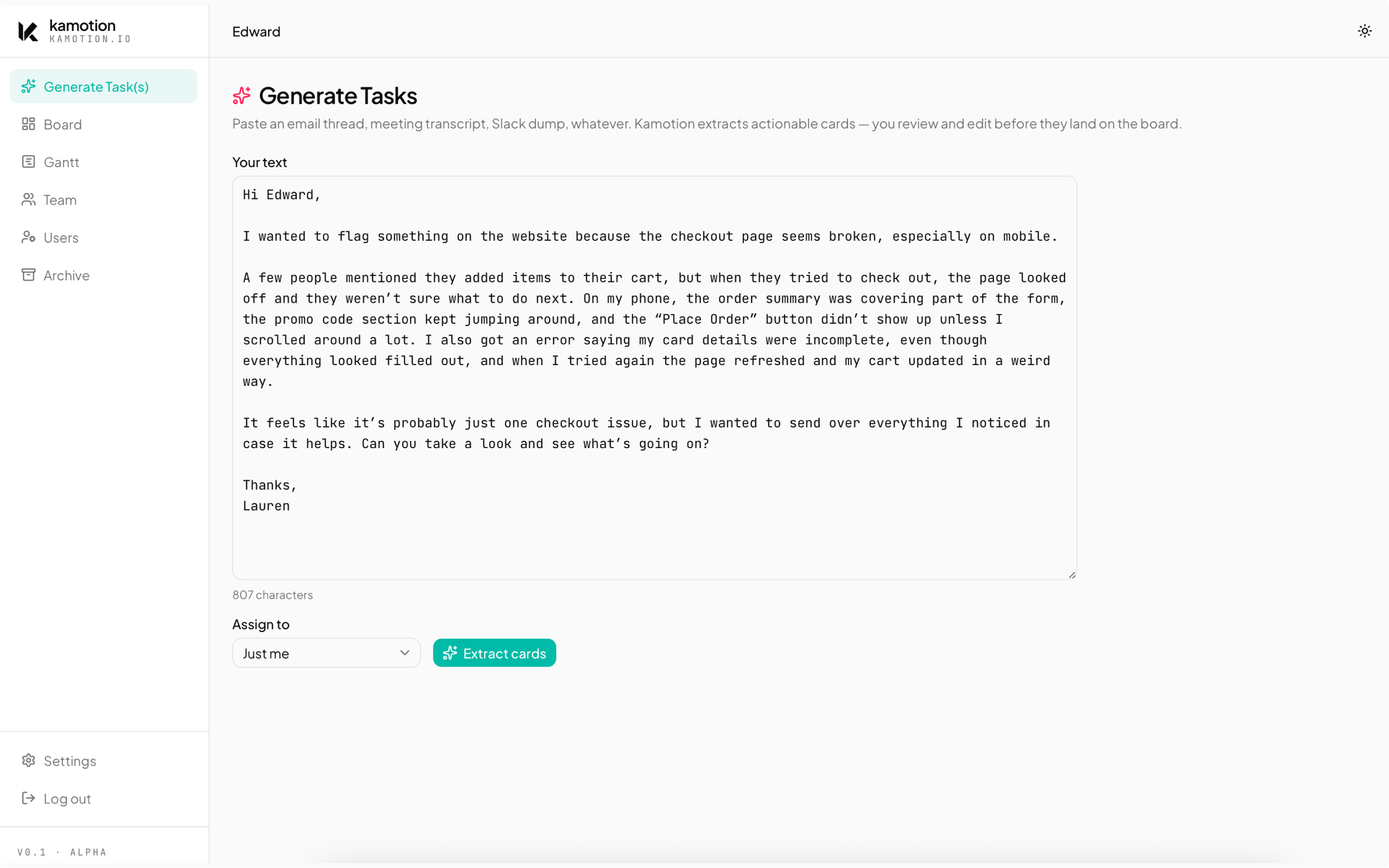
The Generate page with a pasted email in the input. Character count below, Extract cards button ready to fire.
How to use it
- Go to
/app/generatevia Generate Task(s) in the sidebar. - Paste raw text in the textarea.
- Click Generate. The AI returns a list of suggested cards in a preview modal.
- Review each suggestion. Uncheck any you don’t want. You can edit titles, priorities, due dates, and assignees inline.
- Click Add to board. Cards land in the
Readycolumn.
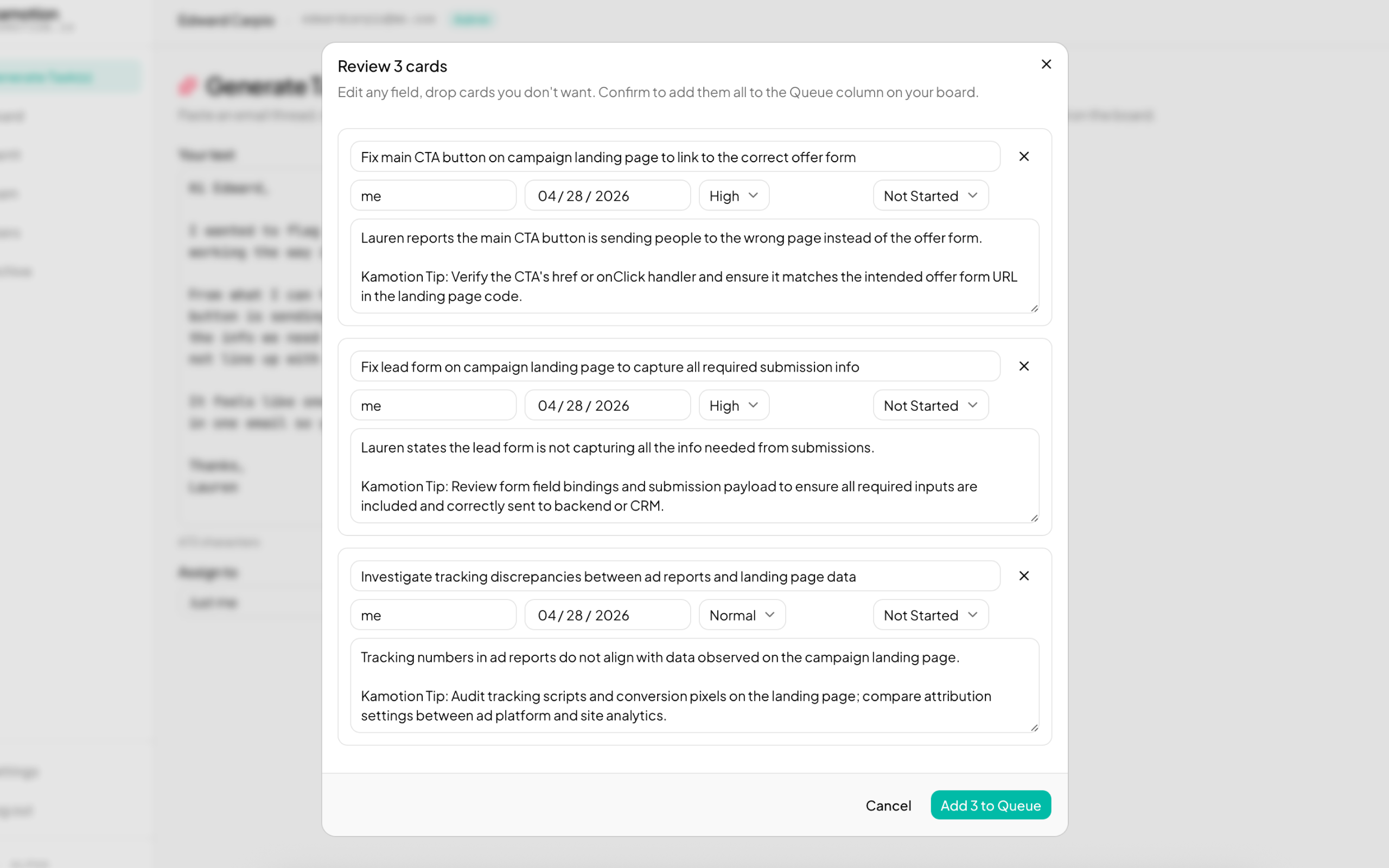
The preview dialog after Generate runs. Parsed cards with mixed priorities and a due date on one; checkboxes pick which make it onto the board.
Output: Multiple cards vs. Single card
Next to Assign to, the Output selector picks the granularity of what the parser returns:
| Output | What you get | Use it when |
|---|---|---|
| Multiple cards | One card per atomic task. The AI decomposes the input — five bugs in one email become five cards. | The default. Use whenever the source has independent items that could be assigned, prioritized, or closed separately. |
| Single card | Exactly one card with an umbrella title and every action folded into a markdown checklist in notes. Highest priority + earliest due date roll up. | The source describes one cohesive job — e.g., an email with five tweaks to a hero section, a brief covering one campaign, a checklist for one deliverable. |
05
Board
The kanban is where the work lives. Five statuses, drag and drop, per-card detail drawer, filter bar.
Five status columns — Queue, Ready, In Progress, Review, Done. Drag between columns to change status; click any card to open the detail drawer.
Creating cards
- Click + New card in any column header → fill the dialog → save. The card lands in that column.
- Or go to Generate tasks for bulk AI extraction.
Moving cards
- Drag across columns to change status.
Blockedis excluded from drag targets — use the drawer to set it. - Drag within a column to reorder. Positions use midpoint math so you can insert anywhere without rewriting every row.
- At desktop width (
lg+), click the collapse chevron on a column header to collapse it into a 56px ribbon. Drop targets still work on collapsed columns.
Editing
- Click any card → side drawer opens with every field editable.
Cmd/Ctrl+Ssaves. Closing with unsaved changes prompts a confirm.- Changing
statusin the drawer auto-moves the card to the matching column on save.
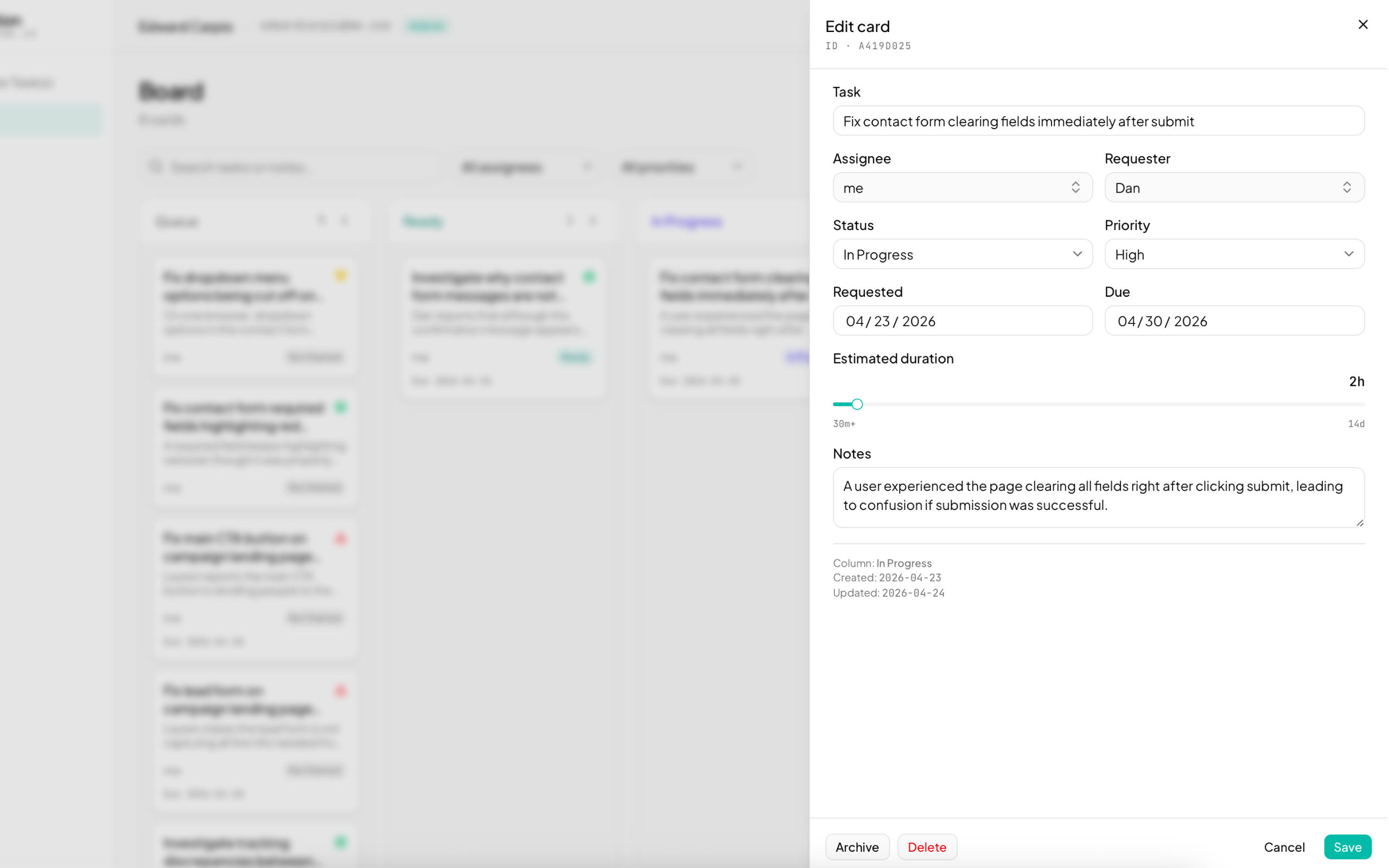
The card detail drawer slides in from the right with every field editable. Archive and Delete live at the bottom; the board stays visible behind it.
Filtering
The filter bar above the board lets you scope by search term, assignee, and a combined priority + blocked-flag dropdown. Filters are session-only and clear on reload.
06
Gantt
Same data, different lens. Gantt shows scheduled cards as bars positioned by due_date and sized byestimated_duration.
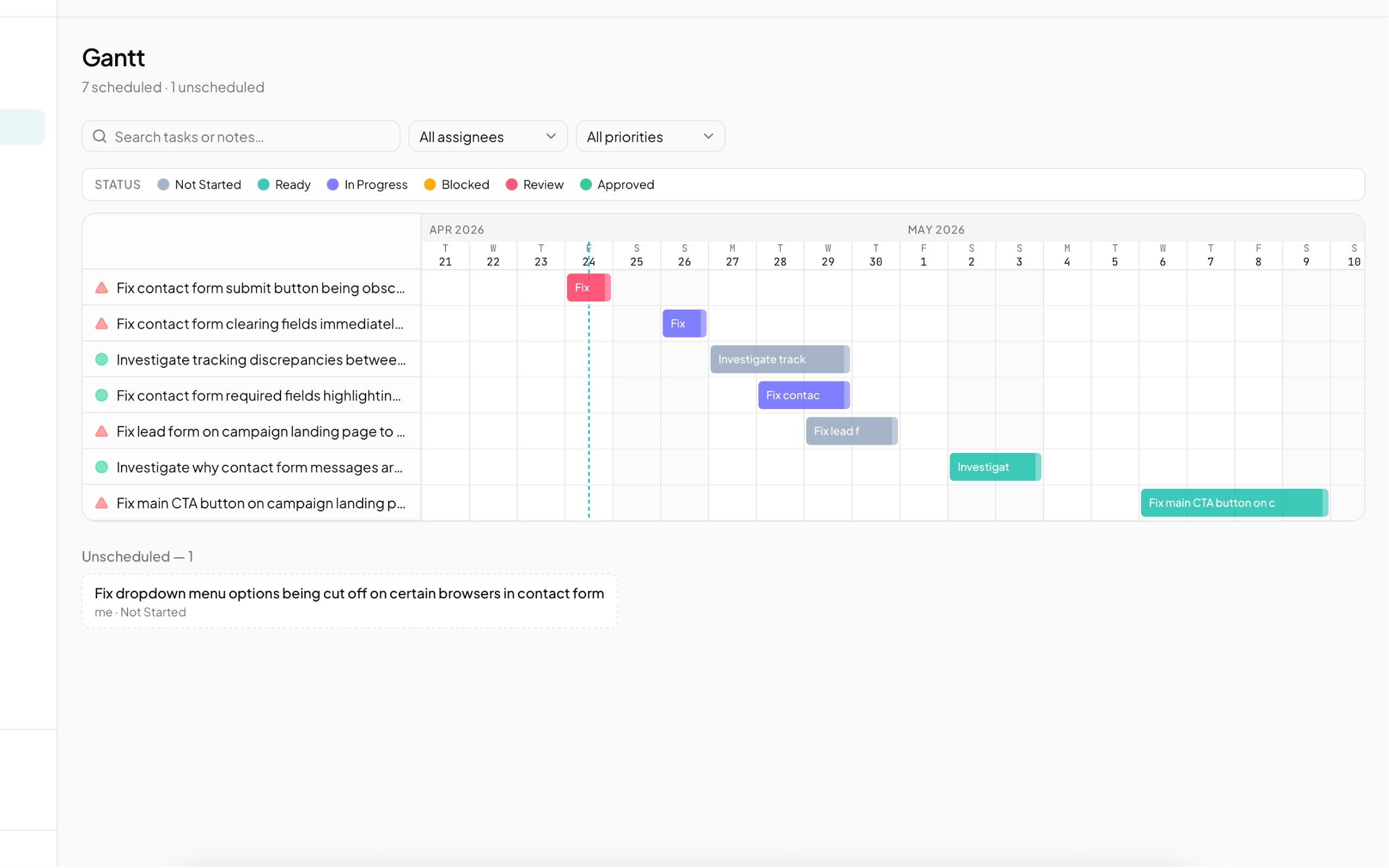
Scheduled cards as bars, positioned by due date and sized by duration. A vertical line marks today; weekends are tinted; unscheduled cards sit below as clickable chips.
Interactions
- Drag a bar left or right to shift the card’s due date. Duration is preserved.
- Click a bar (or the label on the left) to open the card drawer.
- Today line is a vertical marker so you can see what’s late.
- Weekend tint on Sat/Sun columns — a visual cue, not a constraint.
- Unscheduled cards (no due date) are listed below the chart as clickable chips. Open one and set a date to pull it into the Gantt.
07
Time Log
/app/time-logtracks how long you spend on each card. It’s the same dataset as the kanban, viewed as one row per card across three sections — In Progress, Review, Done — with a per-row timer, totals, and CSV export for billing.
Time Log
Mon May 4 → Sun May 10 · 13h logged
| Last logged | Card | Status | Category | Timer | Total | |
|---|---|---|---|---|---|---|
| 2026-05-08 | Refresh quarterly partner deck | In Progress | Design | 27:01 | 3h 30m | |
| 2026-05-07 | Migrate analytics from UA to GA4 | In Progress | Code | 4h 45m | ||
| 2026-05-05 | Fix mobile checkout double-tap bug | Blocked | Code | 45m |
| Last logged | Card | Status | Category | Timer | Total | |
|---|---|---|---|---|---|---|
| 2026-05-06 | Onboarding flow copy review | Review | Revision | 1h | ||
| 2026-05-07 | Q3 OKR review prep | Review | Meeting | 2h |
| Last logged | Card | Status | Category | Timer | Total | |
|---|---|---|---|---|---|---|
| 2026-05-04 | Wire Stripe webhook for invoice paid | Done | Code | 1h |
One row per card across In Progress / Review / Done. Live timer on the partner-deck row; play buttons start a timer on the others. Period filter, card filter, category filter, and CSV export sit at the top.
Logging time
- Click the play button on any row to start a timer. The play turns into a stop button with a live
mm:ssreadout. - Only one timer can run at a time per user — starting a second prompts a 409.
- Click + New log in the header to start a standalone timer (admin work, calls, anything not tied to a card).
- Click Add entry (or the + on a card row) to manually log time you forgot to track. Set the date and duration; start time defaults to 9:00 since only the date and total minutes matter for billing.
Drag = kanban move
Drop a card from In Progress into Review and the kanban reflects it on next visit. The Time Log doesn’t maintain a parallel status — sections derive directly from cards.column_name, so there’s one source of truth.
Categories
Each entry can be tagged with a category — Design, R&D, Code, Revision, Meeting, Admin by default. Cards have a default_category_idthat timers inherit when started, so you usually don’t need to pick one. Admins manage the list at /app/settings/categories.
Period filter and CSV export
- Period: This week, Last week, bi-weekly current/last, this month, last month, custom range, or all-time. Weeks run Monday → Sunday. Bi-weekly current is last week + this week (14 days); bi-weekly last is the two weeks before that.
- Filter by card or category to scope the export to one stream of work.
- Click Export CSV to download one row per session — date, card, category, started, ended, duration, source (timer / manual), and notes. Drop the file straight into your invoicing tool.
08
Team
/app/team is admin-only CRUD for the team_memberstable. Think of team members as the roster of people you can assign work to — they don’t need to have login access to kamotion.
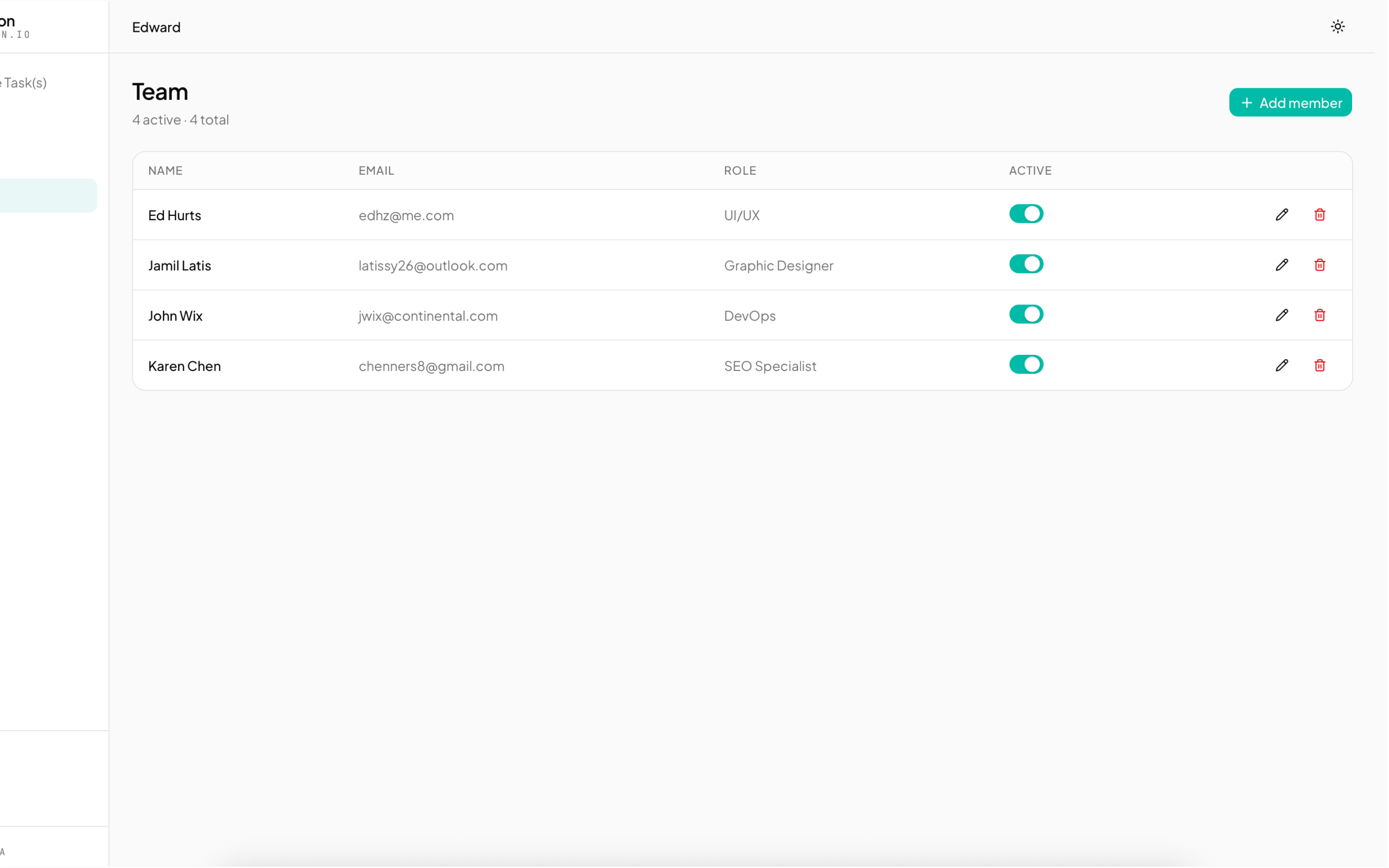
Roster of assignable people — name, email, role, and active toggle per row. Inline edit and delete actions; Add member top-right.
- Click + Add member → fill name/email/role → save.
- Toggle the active switch to hide a member from assignee pickers without deleting them.
- The Link2 icon next to a row means that member is tied to a kamotion user account (created via the Users page). Name and email lock when editing a linked row — edit those on the Users page instead.
09
Users (admin)
/app/settings/users is admin-only CRUD for login accounts. It uses the Supabase Admin API, which requires SUPABASE_SERVICE_ROLE_KEY in your env.
What you can do
- Create — email, password, role, status. kamotion auto-creates a linked team_member row so the new user is immediately assignable.
- Edit — name, role, status. Name changes mirror to the linked team_member.
- Password reset — set a new password for the user directly.
- Delete — removes the auth user; the linked team_member stays (with
user_idnulled out) so historical assignments remain intact.
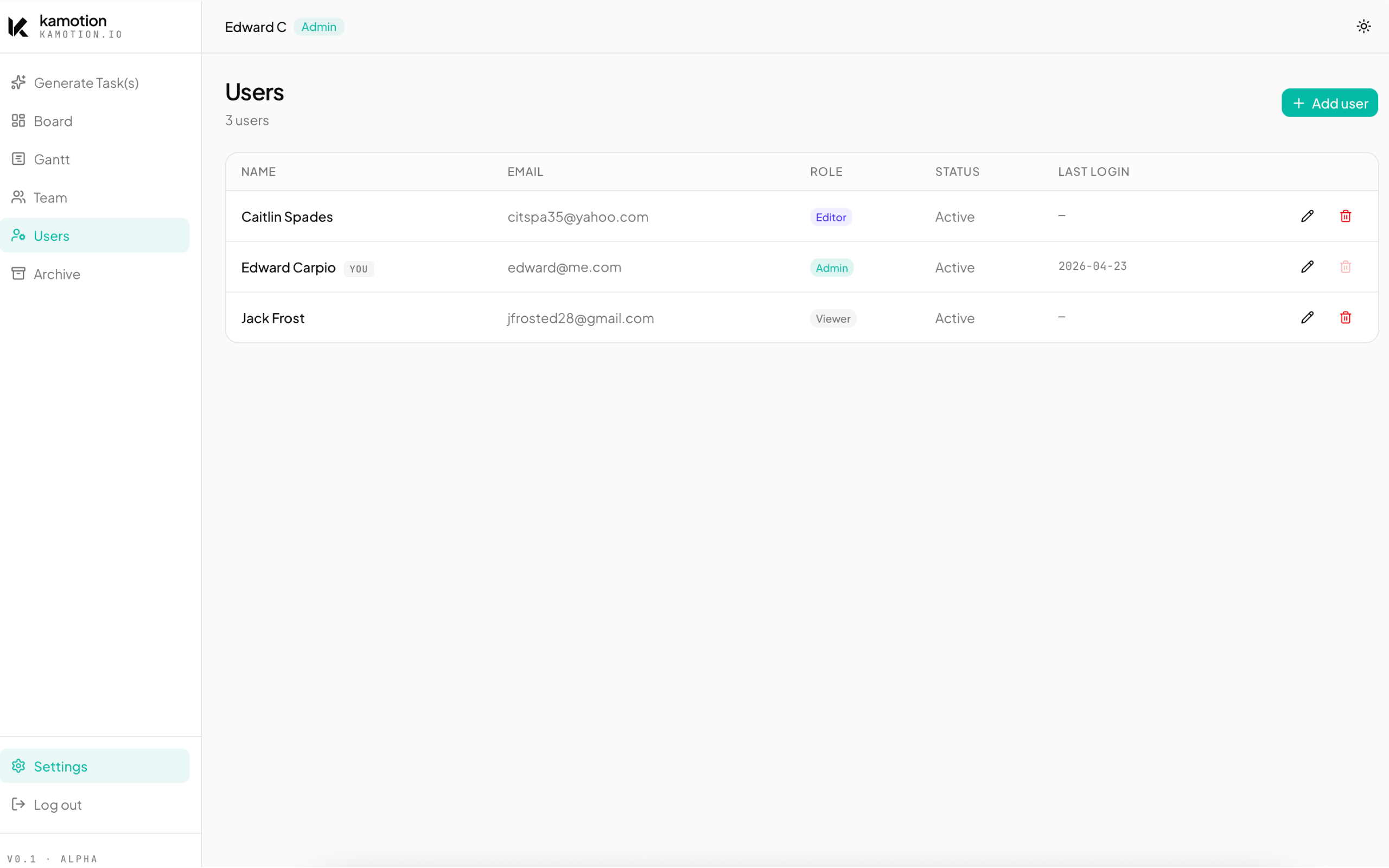
The Users table with active members and Add user top-right. Your own row is tagged so you can't accidentally lock yourself out.
10
Archive
Deleting a card doesn’t erase it immediately. Cards go to /app/archive (admin-only) as a soft delete. You can restore them until a daily pg_cron job purges anything older than the retention window — 90 days by default, configurable in Settings (30/60/90 days, or Keep forever to disable the purge).
- Restore — puts the card back in the column its status points to.
- Delete permanently — bypasses the retention window for cards you know you’ll never need.
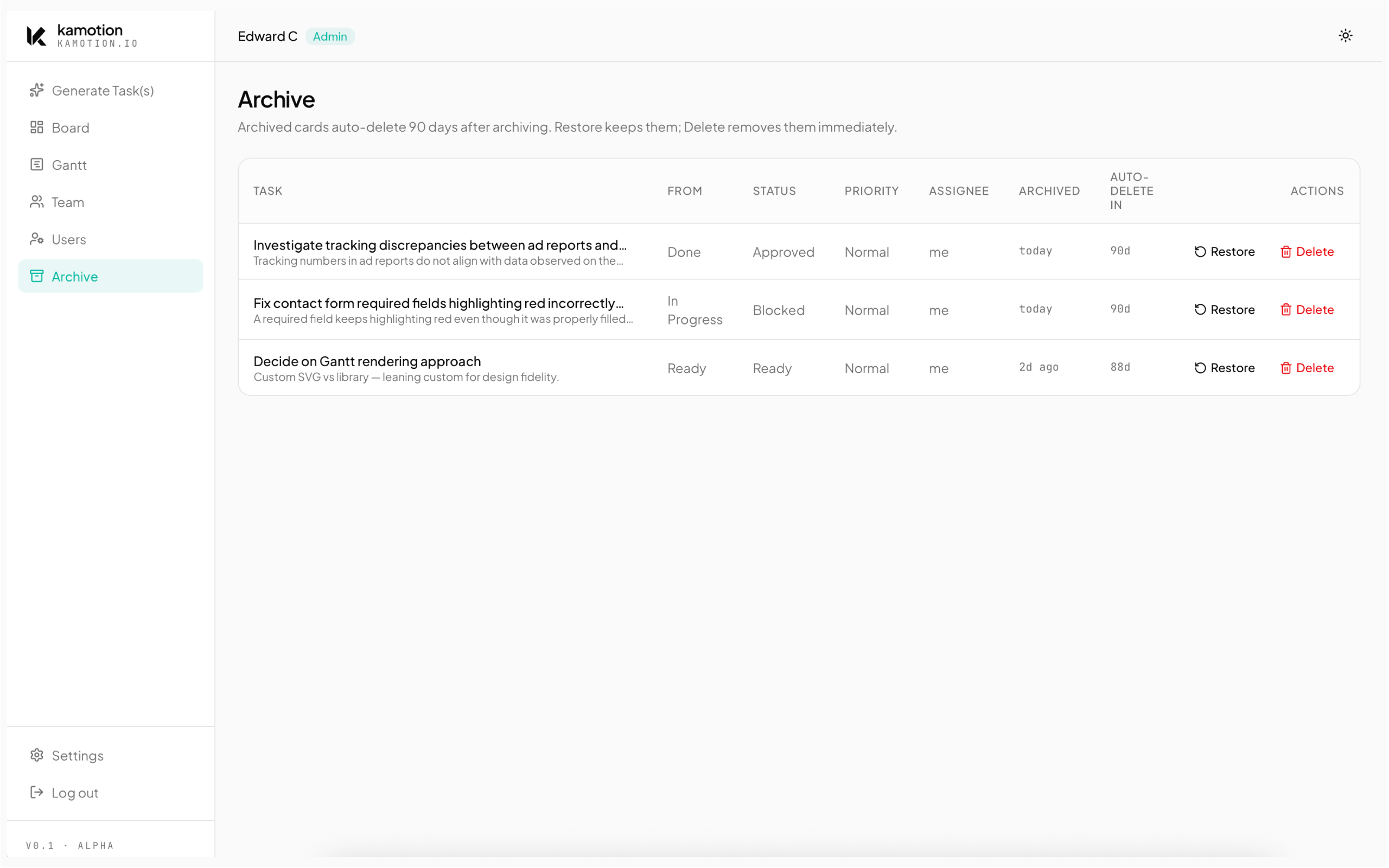
Soft-deleted cards held until the retention window (default 90 days) elapses. Each row has Restore (puts the card back in its status column) or Delete permanently.
11
AI configuration
All AI behavior is configured at /app/settings (admin-only). Two paths are supported:
| Path | When to use it |
|---|---|
| In-app | kamotion calls the AI provider directly. Fastest to set up. Supports OpenRouter, OpenAI, Anthropic, and Google. |
| n8n webhook | kamotion POSTs to your n8n workflow. n8n handles the AI call. Use this when you want to swap models without redeploying, add pre/post-processing (enrichment, routing), or centralize AI logic. See n8n path. |
In-app path setup
- Add your provider key to
.env.local(AI_API_KEY_OPENROUTER, etc). - Go to
/app/settings. - Pick a provider. Each provider has a curated model dropdown plus a
Custom...option for any model slug. - Optionally tune the system prompt and JSON schema. Defaults are production-ready.
- Hit Test parse at the bottom of the page to validate end-to-end with a sample input.
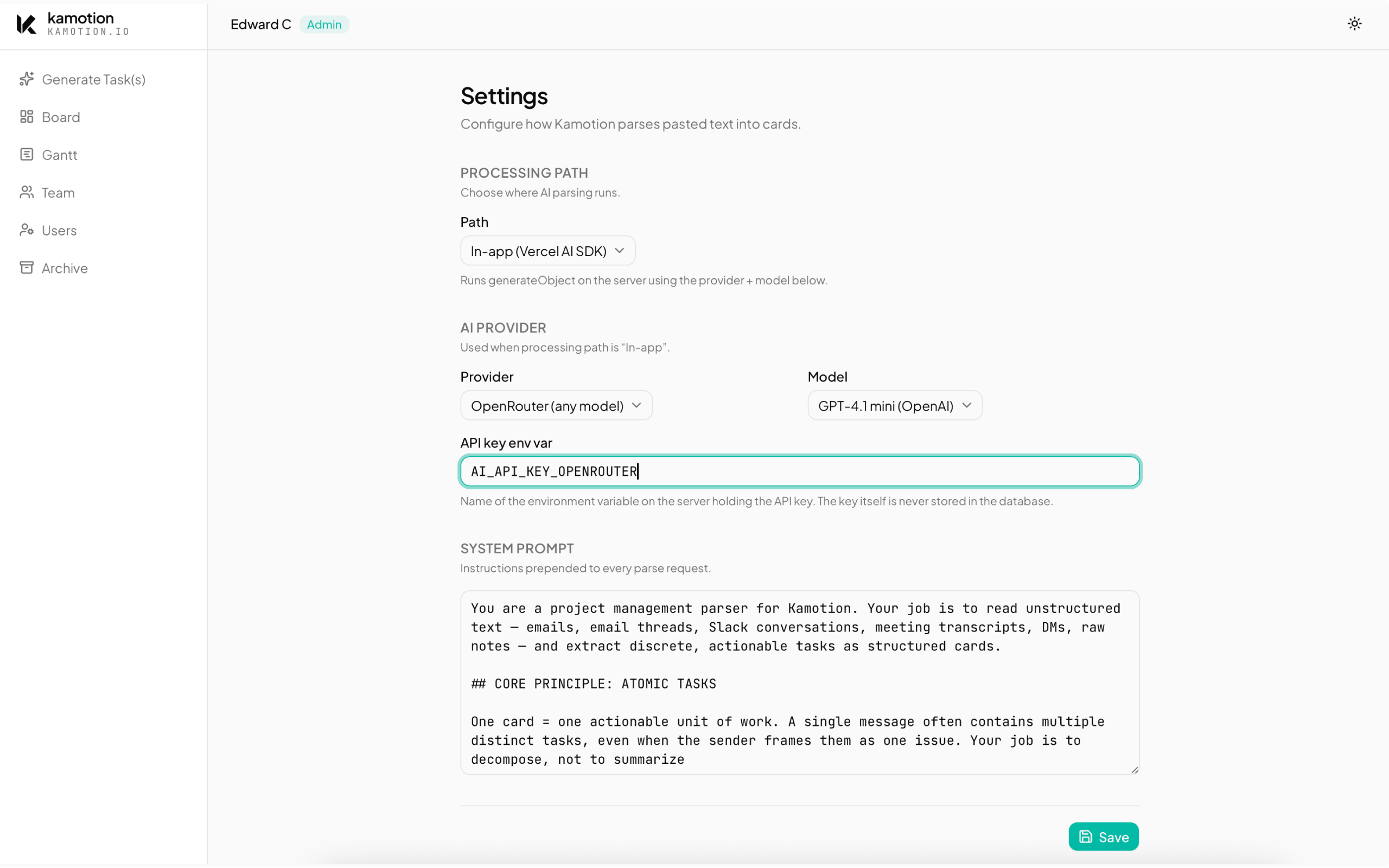
Processing path, AI provider and model, the system prompt, and a Test parse section at the bottom for sanity-checking the pipeline.
12
n8n path
The n8n processing path offloads AI work to a self-hosted n8nworkflow. It’s optional, but unlocks a few things:
- Swap models without redeploying kamotion.
- Chain the AI call with other steps — enrichment, routing, conditional branching, downstream webhooks.
- Use local models via Ollama (keep all AI on-device, zero cloud AI cost).
- Centralize AI prompts if you run multiple internal tools that need the same parser.
Setup summary
- Install and run n8n (Docker one-liner works, see their docs).
- Import
docs/n8n-sample-workflow.jsonfrom this repo. It’s a 4-node starter: Webhook → AI Agent (with Structured Output Parser) → Respond to Webhook. - Attach any Chat Model sub-node to the AI Agent — OpenAI, Anthropic, Gemini, Ollama, anything n8n supports.
- Enable the webhook and copy its URL.
- In kamotion
/app/settings, switch the processing path to n8n and paste the URL. - Optional: set
N8N_WEBHOOK_AUTH_USERandN8N_WEBHOOK_AUTH_PASSWORDin kamotion’s env to send Basic Auth to the webhook.
Full setup guide with troubleshooting is at docs/00_N8N_SETUP.md in the repo.
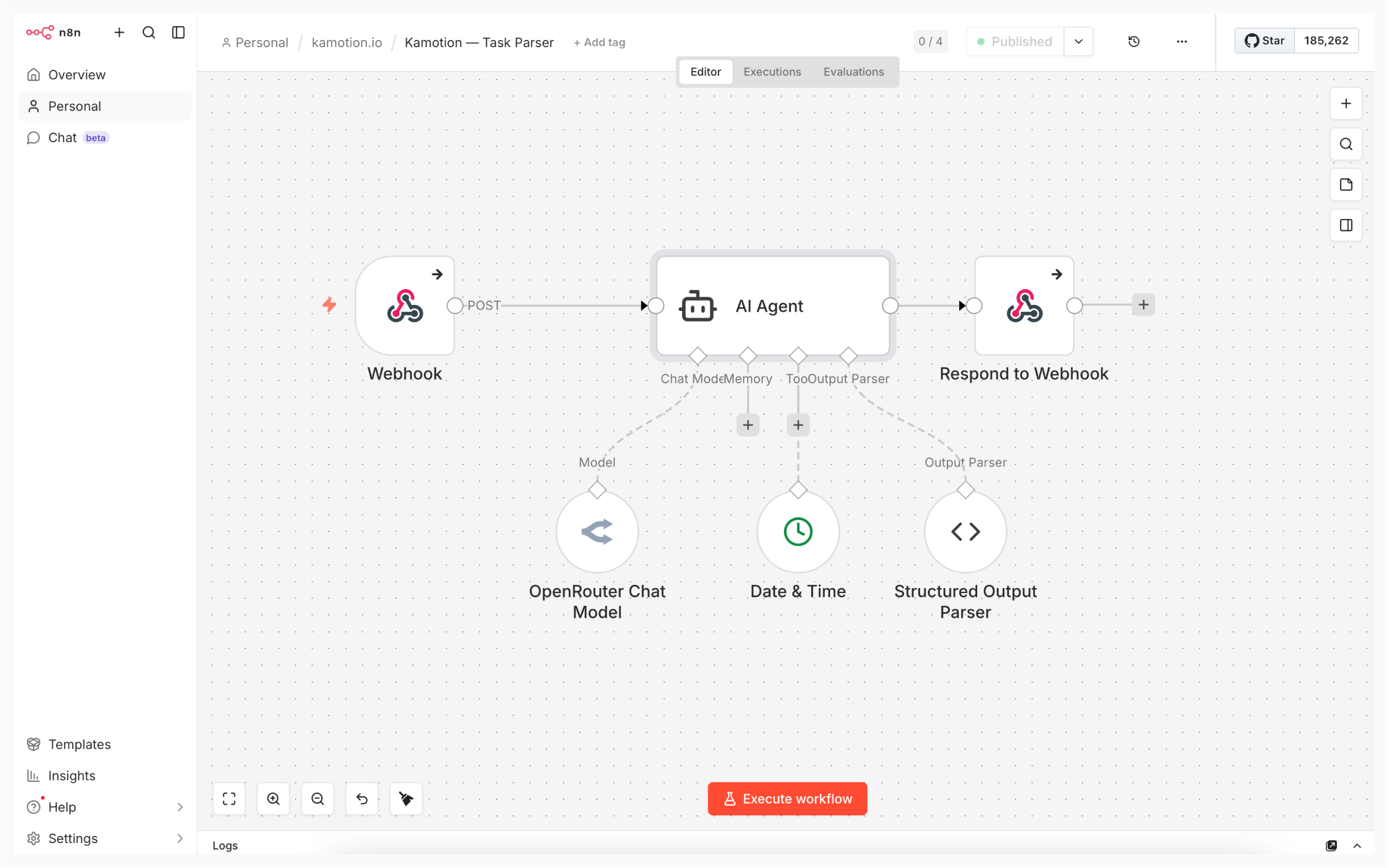
The n8n canvas after importing the sample workflow — Webhook → AI Agent (with a Structured Output Parser) → Respond to Webhook, with a Chat Model sub-node attached.
13
Deployment recipes
Pick whichever matches your preference for control vs. convenience. All four recipes use the same codebase and environment variables — only the hosting layer changes.
| Recipe | Cost | Effort | Best for |
|---|---|---|---|
| Vercel + Supabase | $0 | ~10 min | Easiest cloud path, zero infra |
| Dokploy + VPS | ~$5/mo | ~30 min | Self-host, one-click deploys |
| Docker Compose | $0 if you own a box | ~1 hr | Full control, air-gapped options |
| Local only | $0 | <10 min | Evaluation, personal-only use |
Recipe A — Vercel + Supabase (free)
- Push your fork to GitHub.
- Go to vercel.com/new, import the repo, accept the Next.js defaults.
- Add the same env vars from your
.env.localin the Vercel project’sSettings → Environment Variables. TheNEXT_PUBLIC_*ones must be set before the first build. - Click Deploy. Vercel builds and deploys to a
*.vercel.appURL. Push to main auto-deploys. - Add your custom domain in
Settings → Domains.
Recipe B — Dokploy on your VPS
The current production deployment. Dokploy is an open-source self-hosted PaaS (Heroku-alike) that runs on any Linux box. Nixpacks auto-generates the Dockerfile — you don’t write one.
- Install Dokploy on your VPS (one-liner from their docs).
- Connect your GitHub account in Dokploy.
- Create an app → point it at your kamotion fork → branch
main. - Paste your env vars in the Dokploy env panel.
- Add a domain, turn on HTTPS (Traefik + Let’s Encrypt auto-issues).
- Enable the GitHub webhook → every push to main triggers a rebuild and container swap.
Full walkthrough at docs/00_DEPLOY.md in the repo — including the engines.node: "22" pin (Nixpacks tops out at Node 23 currently), the $-in-password gotcha, and rollback via Dokploy’s last-10-deployments list.
Recipe C — Docker Compose self-host
If you want to run on your own hardware without a PaaS layer, use Docker Compose. The repo ships a Dockerfile suitable for a standalone Next.js build. Pair with a reverse proxy (Caddy or nginx) for HTTPS. You can also run your own Supabase locally via Supabase’s self-host Docker setup for a fully offline stack.
Recipe D — Local only
For evaluation or personal single-machine use, npm run dev against a free Supabase project is enough. No deployment layer at all.
14
Run it for $0
kamotion can run end-to-end with zero recurring cost. Here’s a full free-tier recipe:
| Layer | Free option | Limits to know |
|---|---|---|
| Database + Auth | Supabase free tier | 500 MB Postgres, 1 GB storage, 50 K monthly active users, 2 projects. Details. |
| Hosting | Vercel Hobby or any Linux box you own | Vercel free: 100 GB bandwidth, serverless functions. No ads, no card required. |
| AI (cloud, free) | OpenRouter free-tier routes | Several models have free routes (e.g. Llama 3.3, Gemini Flash). Rate-limited but usable for personal volume. |
| AI (local, truly free) | Ollama on your machine | 100% free, fully offline. Use the n8n path to point kamotion at Ollama via n8n’s Ollama node. |
| AI orchestration (optional) | n8n self-hosted (Docker) | 100% free, no account needed. Runs locally or on the same box as kamotion. |
15
Hosted access
Not every team wants to run their own server. If you’d rather skip the infrastructure and just use kamotion, there’s a managed-hosting path — the project author will host an instance for your team and hand you the keys.
Same product, same AI configuration options, same kanban + Gantt surface — your data lives on a Supabase project provisioned for you, and you get an admin login to manage your own users.
Hosted access is a good fit if any of these apply:
- You want kamotion's value but your team doesn't have a backend engineer.
- You'd rather pay for a managed instance than spend hours on Supabase + Dokploy + DNS.
- You want a single point of contact when something breaks, instead of debugging Postgres yourself.
If you’d rather self-host (and you have the technical chops), everything you need is in this doc — see Deployment and Run it for $0.
16
Tech stack
| Layer | Choice | Why |
|---|---|---|
| Framework | Next.js 16 (App Router) + Turbopack | Server components, file-based routing, fast dev loop |
| Language | TypeScript (strict) | Catch bugs at the seam, better editor experience |
| Styling | Tailwind v4 + shadcn/ui + Radix | Utility-first, accessible primitives, zero runtime |
| DnD | dnd-kit (core + sortable) | Keyboard-friendly, composable, no HTML5 drag quirks |
| Data fetch | TanStack Query v5 | Optimistic updates, cache invalidation, server-state sanity |
| Forms | React Hook Form + Zod resolvers | Uncontrolled performance + schema-validated parsing |
| Data layer | Supabase (Postgres + Auth + RLS) | One service for DB, auth, and row-level security |
| AI | Vercel AI SDK v6 → OpenRouter (default) | Provider-agnostic, swap models without rewriting calls |
| Logging | pino + pino-pretty (dev) | JSON logs in prod, readable logs locally |
17
Contributing
The repo is public at github.com/edwrdcrpio/kamotion.io — open issues for bugs and feature requests, send PRs for fixes. Conventions:
Commit style
Conventional commits. Every message starts with a type:
feat(time-log): card-centric tracker with per-row timer + DnD
fix(demo): unregister MSW service worker on demo exit
docs: add n8n setup walkthrough
refactor: extract site nav and footer into shared components
Dev loop
bashnpm run dev          # start dev server
npx tsc --noEmit     # typecheck
npm run build        # production build
npm run lint         # eslint
PR expectations
- Typecheck clean, build clean.
- One feature per PR — no drive-by refactors on unrelated code.
- Update the relevant doc (this page, or docs/*.md) in the same PR.
- If you change a DB schema, add a migration under supabase/migrations/ with a zero-padded prefix.
18
FAQ
Can I switch AI models without redeploying?
Yes — everything is configured at /app/settings. Change provider or model, save, and the next parse uses the new config. No code change, no restart.
Does it work offline?
The app itself needs the Supabase connection to run. But if you self-host Supabase locally (via Docker) and use Ollama for AI via the n8n path, the entire stack runs on your LAN with no internet.
How do I back up my data?
Supabase provides daily backups on paid tiers and manual point-in-time exports on free tier via pg_dump. Since kamotion is pure Postgres + auth, any standard Postgres backup tool works.
Can I use it for a team?
Yes. It’s optimized for solo-first but supports up to a handful of members with role-based access (admin / editor / viewer). There’s no built-in billing or org separation — it’s one board per instance.
Will there be public signup?
Not planned. kamotion is invite-only by design — admins provision users. If you want a SaaS with public signup, fork the repo and wire it up.
Why “kamotion”?
Slang for commotion— the organized chaos of messages, threads, and calls that become clarity once they’re on a board.
19
Coming soon
kamotion today is the kanban and the parser. Here’s what’s on deck — what you’ll see land in the repo next.
- Inbox sync — kamotion pulls new emails on its own and queues them for parsing. Skip the paste step entirely.
- Slack & Telegram bots — tag
@kamotionin a channel and the thread becomes cards without anyone leaving the conversation. - Active comms — due-date nudges, team pings, and drafted follow-up emails routed to whoever owns the card.
- Delegate to AI — assign a card to an agent to write the blog, email the vendor, plan the event, or fix the site bug. You review the output before it ships.
Roadmap is best-effort, not a contract — but the order roughly reflects how we’re sequencing them. Each lands behind a feature flag so you can opt in when you’re ready.